
 n
Support and DevOps Services: Ensuring Stability and Growth
Support and DevOps services ensure that applications run smoothly, securely, and efficiently. From monitoring systems to managing deployments, these services help businesses avoid downtime and improve performance.
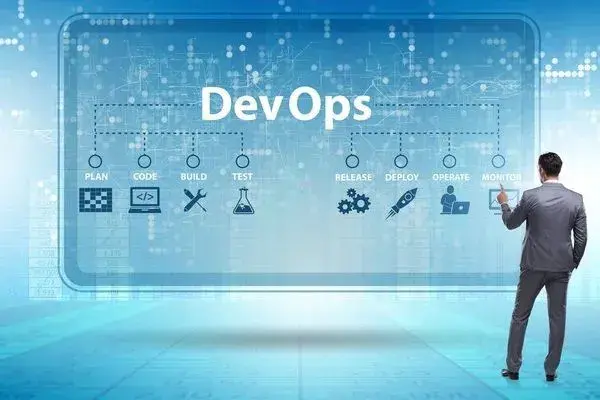
Introduction to Support and DevOps
Support and DevOps services are essential for maintaining the performance and reliability of modern digital systems. After a product is developed and deployed, continuous monitoring and maintenance are required to ensure smooth operation. These services help businesses keep their applications running efficiently without interruptions.
DevOps combines development and operations to create a more streamlined workflow. It focuses on collaboration, automation, and continuous improvement. By integrating these practices, businesses can deliver updates faster and maintain high-quality standards in their applications.
Importance of Continuous Monitoring
Continuous monitoring plays a key role in identifying and resolving issues before they impact users. It involves tracking system performance, server health, and application behavior in real time. This proactive approach helps businesses prevent downtime and maintain a seamless user experience.
With proper monitoring tools, teams can detect anomalies, analyze performance metrics, and take corrective actions quickly. This ensures that systems remain stable and reliable. Continuous monitoring is crucial for maintaining trust and satisfaction among users.
Automation and CI/CD Pipelines
Automation is a core component of DevOps that helps streamline development and deployment processes. Continuous Integration and Continuous Deployment pipelines allow teams to automate code testing, building, and deployment. This reduces manual effort and minimizes errors.
By implementing CI/CD, businesses can release updates more frequently and efficiently. It ensures that new features and fixes are delivered quickly without disrupting the system. Automation improves productivity and enhances the overall development workflow.
What is the difference between application support and DevOps?
Application support keeps a live system working for its users by answering issues, fixing bugs and handling routine maintenance. DevOps focuses on how software is built, tested, released and run, so that changes reach production safely and quickly.
The two overlap and work best together. Support teams see problems first and feed them back as fixes and improvements, while DevOps practices such as automated testing, repeatable deployments and good monitoring reduce how often problems reach users in the first place.
When comparing service providers, check which of these activities are included. Some offer only reactive support, some offer only infrastructure and pipeline work, and some cover both under one agreement.
| Area | Application support | DevOps |
|---|---|---|
| Main goal | Keep the live system usable | Ship changes safely and reliably |
| Typical work | Tickets, bug fixes, user queries | Pipelines, infrastructure, automation |
| Triggered by | Users and alerts | Planned engineering work |
| Key measures | Response and resolution times | Deployment frequency and failure rate |
What should a support SLA include?
A service level agreement should define severity levels, the response and resolution targets for each level, the hours of cover, and how issues are reported and escalated. Without these, both sides will interpret urgency differently.
Severity levels usually range from critical, where the system is down or data is at risk, to low, where there is a minor issue or a request with a workaround. Note that response time (when someone acknowledges and starts work) is different from resolution time (when the issue is fixed), so check that the agreement states both where relevant.
Also confirm the support hours and time zone, whether weekend or holiday cover is available, what is excluded (for example, third-party service outages), how the provider reports on tickets each month, and who you contact when an issue is not progressing.
How should a team respond when something breaks in production?
The first priority is to restore service for users, and the second is to understand and fix the underlying cause. A short, agreed incident process keeps people calm and avoids wasted time.
A typical process has five steps. Detect the problem through monitoring or user reports. Assess severity and assign one person to coordinate. Communicate a short status update to stakeholders and affected users. Mitigate quickly, for example by rolling back the last release, switching off a feature flag or scaling up resources. Then fix the root cause properly once the system is stable.
After any significant incident, hold a blameless review that records what happened, why it was not caught earlier, and which specific actions will prevent a repeat. Keeping these reviews in a shared place builds useful knowledge over time.
What is infrastructure as code and why does it matter?
Infrastructure as code means defining servers, networks, databases and other cloud resources in configuration files instead of setting them up by hand in a console. Tools such as Terraform, OpenTofu, AWS CloudFormation and Pulumi are commonly used for this.
Because the setup is written down, environments can be recreated consistently, changes can be reviewed before they are applied, and the history of every change is kept in version control. This makes it much easier to build matching staging and production environments and to rebuild infrastructure after a serious failure.
It also reduces dependence on any one person who remembers how the servers were configured, which matters when team members change or when you move to a new support provider.
How should backups and disaster recovery be planned?
Start by agreeing two targets: how much data the business can afford to lose, known as the recovery point objective (RPO), and how long the system can be unavailable, known as the recovery time objective (RTO). These targets decide how often you back up and how much standby infrastructure you need.
A widely used guideline is the 3-2-1 rule: keep at least three copies of important data, on two different types of storage, with one copy kept off-site or in a separate account or region. Backups should be encrypted and access to them restricted.
Most importantly, test restores on a regular schedule. A backup that has never been restored is an assumption, not a recovery plan.
What should you ask before hiring a support and DevOps partner?
Ask how they will learn your system, how they handle incidents, and what you will own if the relationship ends. The answers reveal more than a list of tools.
Useful questions include: How will you onboard onto our existing code and infrastructure? What monitoring and alerting will you set up, and who receives alerts? How are access rights and credentials managed? Will all infrastructure and pipeline definitions be kept in our own repositories? What documentation will you maintain? How do you hand over if we change providers?
VayuZon Technology can help you set up dependable support and DevOps practices that fit the size and stage of your product.