
 n
nApplication Support Services: Keeping Your Software Running Smoothly
Proactive monitoring, rapid issue resolution, and continuous optimization keep your applications secure, reliable, and high-performing. Drive business growth with reduced downtime, improved efficiency, and scalable software support solutions.
Introduction
Software is only valuable when it stays available, secure, and performant. Application Support Services encompass a suite of activities aimed at ensuring the stability and efficiency of business-critical applications, from proactive monitoring and issue resolution to upgrades and performance optimization. These services minimize downtime, enhance user experience, and help organizations adapt their software to evolving business needs.
1.Core Services: Monitoring, Incident Response, and Maintenance
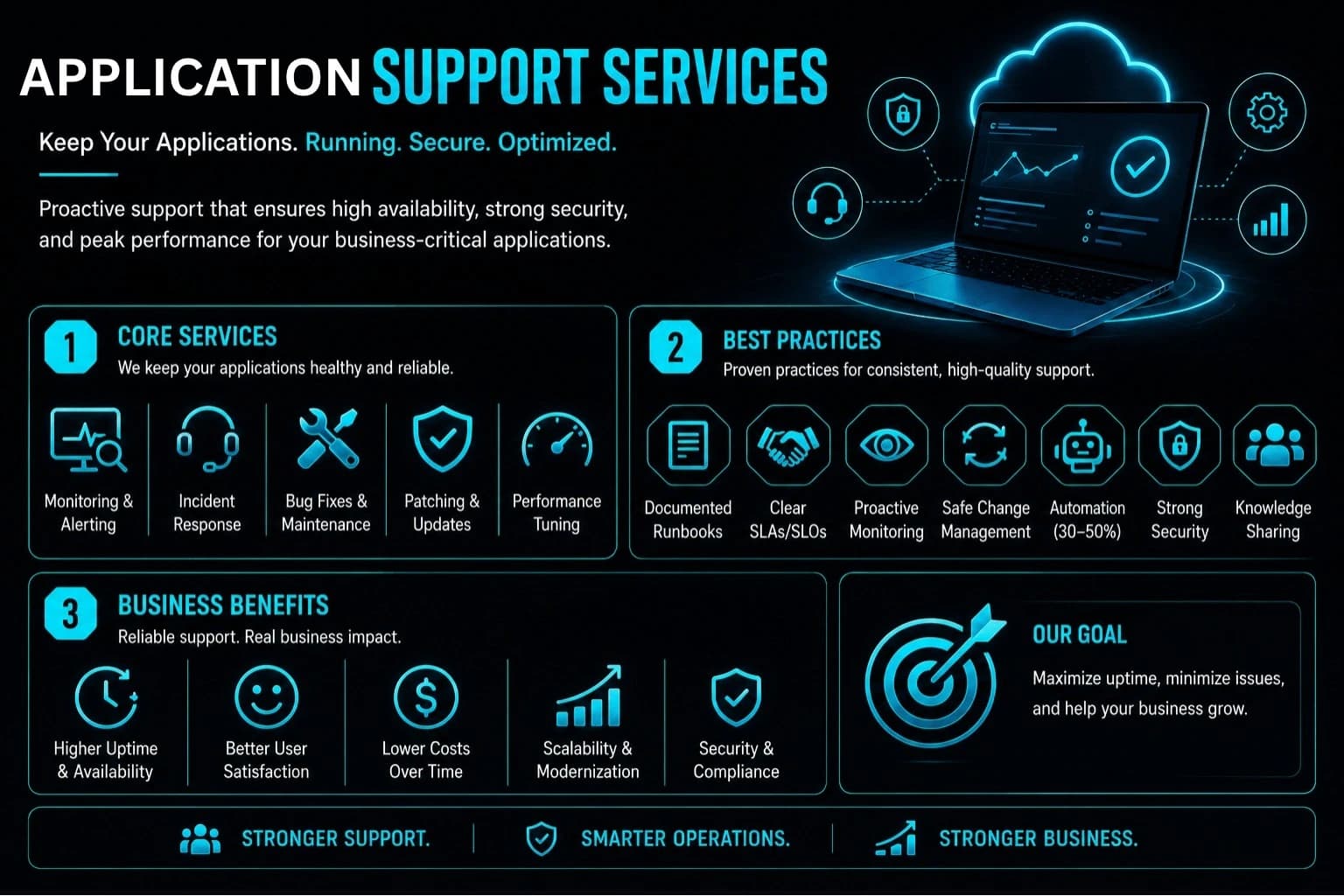
Application support covers a well-defined set of tasks that keep software healthy throughout its lifecycle: Proactive monitoring and alerting: Observing systems in real-time to detect anomalies before users notice them Incident response and troubleshooting: Diagnosing and resolving problems quickly to restore service Corrective maintenance: Fixing bugs and defects that users or monitoring systems uncover Patching and updates: Applying security patches, OS updates, and library upgrades to stay current and secure Performance tuning: Optimizing response times, resource usage, and scalability as demand grows The primary goal is to keep applications available, dependable, and relevant to changing business requirements.
2. Business Benefits: Uptime, Cost Savings, and Scalability
Investing in application support delivers measurable business value: Reduced downtime and higher availability: Mission-critical systems stay stable and responsive, preventing revenue loss and reputational damage Improved user satisfaction: Fast resolution times and consistent performance keep employees and customers engaged Lower long-term costs: Preventive maintenance and automation reduce emergency fixes and inefficient workarounds Scalability and modernization: Support teams enable smooth migration to cloud-native architectures, legacy modernization, and feature enhancements as business needs evolve Security and compliance: Continuous monitoring and patching ensure software meets regulatory requirements and withstands evolving threats Organizations that treat application support as a strategic function—rather than a reactive cost center—gain reliability, agility, and competitive advantage.
How is application support different from IT support and software development?
Application support focuses on keeping specific business applications working correctly, while general IT support covers devices, networks and user access, and software development builds new features. The three overlap, but they need different skills and different ways of working.
An application support team needs to understand how the application behaves, its data, its integrations and its business rules. They investigate errors, data issues and performance problems in that application, and they decide whether something is a configuration change, a data correction or a code defect.
Development teams usually work in planned releases, while support teams respond to live issues. Having both clearly defined, with an agreed way to pass defects from support to development, avoids situations where urgent fixes are delayed or new feature work keeps getting interrupted.
What are L1, L2 and L3 levels in application support?
In application support, L1 handles user queries and known issues, L2 investigates application behaviour, logs and data, and L3 makes code-level fixes or architectural changes. Each level resolves what it can and escalates the rest with full details.
A good tiered setup relies on shared knowledge. Known errors and their workarounds should be documented so L1 can resolve more without escalation, while L2 and L3 feed what they learn back into that knowledge base.
| Level | Focus | Examples |
|---|---|---|
| L1 | User queries and known issues | Login problems, how-to questions, logging tickets |
| L2 | Investigation and configuration | Log analysis, data corrections, configuration fixes |
| L3 | Code and architecture | Bug fixes, patches, performance changes in code |
What SLA terms should an application support contract define?
An application support SLA should define availability targets, response and resolution times by priority, maintenance windows, recovery objectives and how changes are approved. These terms set clear expectations for both the business and the support team.
Availability is usually stated as a percentage over a period. For example, 99.9 percent availability over a 30-day month allows roughly 43 minutes of downtime, so it is worth checking whether planned maintenance counts towards that figure. Recovery Time Objective (RTO) is the maximum acceptable time to restore the application after a failure, and Recovery Point Objective (RPO) is the maximum amount of data, measured in time, that the business can afford to lose.
Also look for a defined change management process, so updates and patches are tested and approved before reaching production, and for regular service reports. Ask how backups are taken and how often restoring them is actually tested, since an untested backup gives limited assurance.
What should an application support runbook contain?
A runbook is a written guide that tells the support team how to operate the application and respond to known situations. It should cover system overview, routine tasks, common alerts and their fixes, escalation contacts and recovery steps.
Useful runbooks include an architecture summary with servers, services, databases and integrations; how to check application health; step-by-step actions for frequent alerts or errors; how to restart services safely; how to restore from backup; and who to contact for each third-party system.
Runbooks only help if they stay current. Review them after every major incident and every significant release, and keep them somewhere the whole support team can find quickly during an outage.
What should be handed over when you outsource application support?
When moving application support to a new team, hand over access, documentation, known issues and the knowledge held by the people who currently run the application. A structured handover reduces the risk of service disruption during the transition.
A practical handover checklist includes source code and deployment access, environment details for development, testing and production, monitoring and logging tools, existing runbooks, open tickets and known defects, third-party licences and vendor contacts, and any scheduled jobs or integrations that run in the background.
It helps to plan a transition period where the outgoing and incoming teams work in parallel, with the new team gradually taking over ticket handling. Agree success criteria for the transition in advance, such as the new team resolving tickets independently. VayuZon Technology can help businesses set up and run application support in this structured way.
Conclusion
Application Support Services are essential for keeping software running smoothly, securely, and efficiently. By combining proactive monitoring, rapid incident response, routine maintenance, and performance optimization, support teams ensure applications deliver consistent value to users and the business. Adopting best practices like runbooks, clear SLAs, automation, and cross-team collaboration further strengthens reliability and reduces costs. For any organization relying on software, investing in application support is not optional—it's the foundation of operational resilience and long-term success.